Dreamhost API Integration

DreamHost web-hosting affiliate payouts land in Google Ads, Microsoft Ads, and Meta inside wecantrack the moment they fire, matched per SubID to the click that drove the signup.

All your Dreamhost conversions in:

How to integrate Dreamhost affiliate conversions in Google Analytics

In order for us to Dreamhost conversions in Google Analytics and other marketing tools you use, it is necessary to attribute your sales data to the traffic data from your websites or landing pages. Our system automatically places SubIDs in all your affiliate links, which enables us to automatically match your traffic and affiliate conversion data.

The installation is done in four simple steps:

  1. Create a wecantrack account
  2. Connect your Dreamhost account to our system via API
  3. Connect your website to our system
  4. Activate the integration feature


If you would like to connect your Dreamhost publisher account to wecantrack you need to give us your account’s API key and Network ID for each of your Dreamhost affiliate accounts. Those credentials need to be filled in within our data sources page which you can find by following this link: https://app.wecantrack.com/user/data-source/networks/dreamhost/accounts/create

You can give each of the data connections different names and tags which enables you to easily filter your data on account or sub account level.
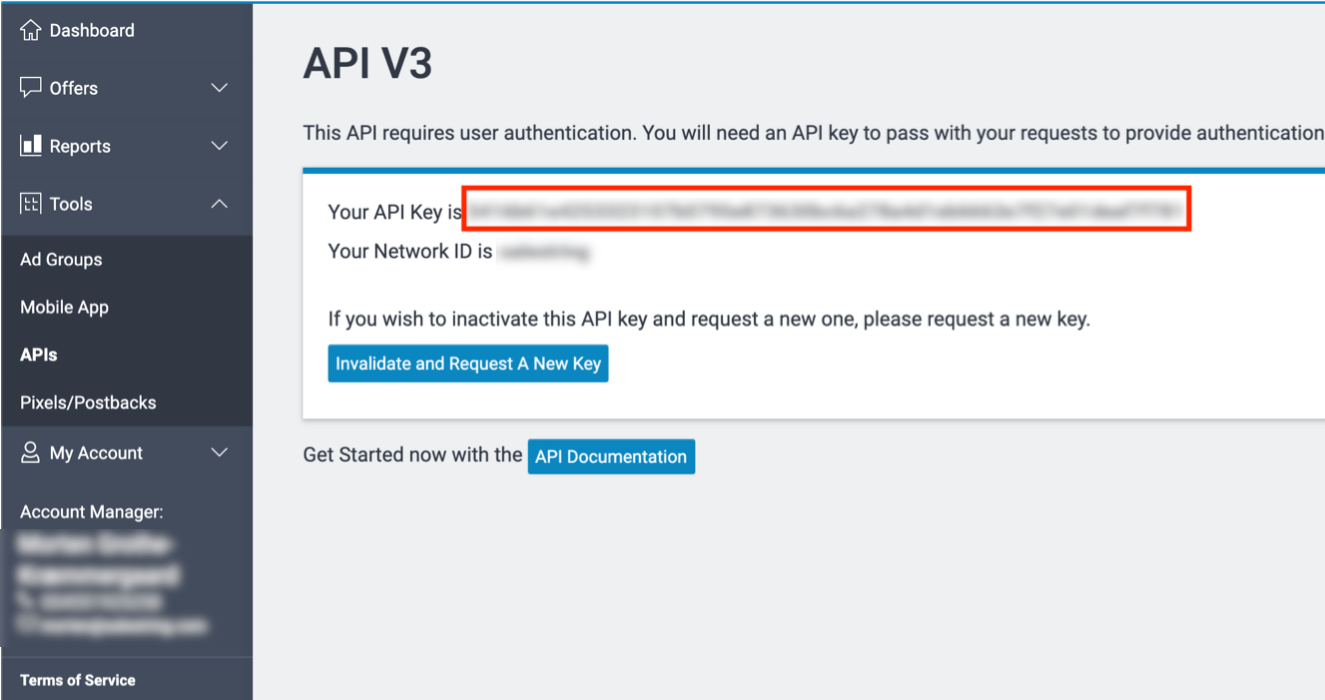
Where can I find my Dreamhost Publisher API key?

  • Log into your DreamHost affiliate publisher dashboard.
  • Go to Account > API.
  • Generate a Publisher API key.
  • Copy the key and paste it into the wecantrack DreamHost data source.
  • Log into your Dreamhost affiliate network account
  • Go to Tools – APIs
  • Here you can find your API key, if it is not available yet you need to request one by clicking on the button
  • Paste your key in wecantrack

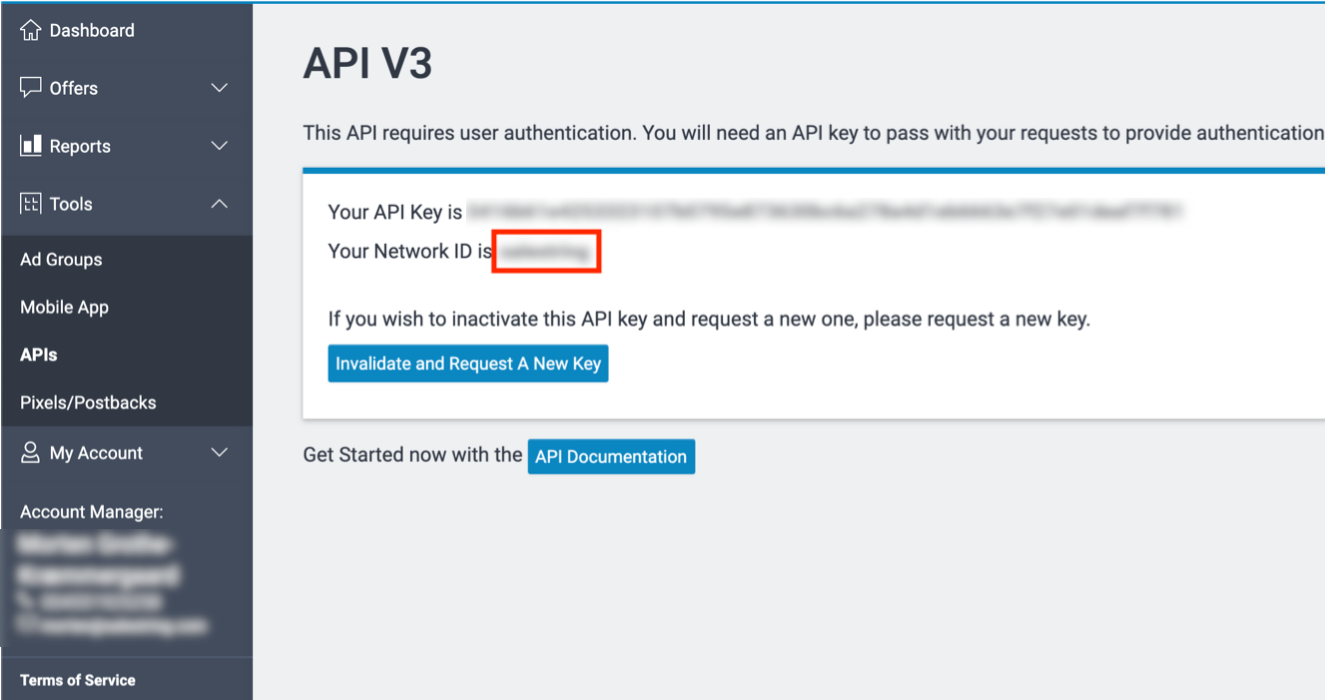
Where can I find my Dreamhost Network IDs?

  • Inside your DreamHost affiliate dashboard, your Network IDs (referral codes / Tracking IDs) are listed in Account > Tracking.
  • Copy the IDs you want wecantrack to track and paste them as a comma-separated list into the DreamHost data source.
  • Log into your Dreamhost affiliate network account
  • Go to Tools – APIs
  • Here you can find the Network ID, if it is not available yet you need to request one by clicking on the button

Who this DreamHost integration is for

Connecting DreamHost to wecantrack makes sense if you fall into any of these buckets:

  • Web-hosting review sites and tech blogs running DreamHost affiliate links across shared, VPS, and dedicated hosting plans who need per-plan commission data back in Google Analytics.
  • WordPress and developer-focused content publishers with high-volume DreamHost click activity who need clean SubID attribution for paid acquisition.
  • Paid media buyers running Google Ads, Microsoft Ads, or Meta to DreamHost landing pages and needing first-payment CPS data flowing back for hosting-vertical ROAS optimisation.
  • YouTube and newsletter creators reviewing web hosts and recommending DreamHost who need session-level commission data alongside their DreamHost dashboards.
  • Existing wecantrack customers adding DreamHost alongside other web hosting affiliate programs (Bluehost, SiteGround, Hostinger) for unified hosting-vertical attribution.

DreamHost affiliate program at a glance

DreamHost logo

DreamHost is a US-based web hosting and WordPress hosting provider with a long-running direct affiliate program covering shared, VPS, dedicated, and managed WordPress plans. Connect your DreamHost affiliate account to wecantrack and every commission lands in Google Ads, Microsoft Ads, and Meta tied to the click that drove the signup.

  • Brand type: US web hosting and WordPress hosting provider
  • Integration method: API (Publisher API key + Network IDs)
  • Tracked event: Qualifying new customer signup
  • Commission models: CPA (up to $200 per signup, tier-based)
  • Reporting granularity: Per-Tracking-ID, per-affiliate, per-SubID
  • Cookie window: 97 days
  • Publisher payouts: Monthly via PayPal, USD
  • Program contact: DreamHost affiliate dashboard at dreamhost.com

Frequently asked questions

Does DreamHost support API or only Postback URL?

On DreamHost, the integration with wecantrack runs through the API. Generate the credentials in wecantrack (or DreamHost), paste them in the other system, and conversions flow on every qualifying event.

What event does the DreamHost integration track?

Whatever the DreamHost offer is configured to fire on: a completed sale, a qualified lead, or a custom event. Sale amount, commission, transaction ID, and SubID flow through to wecantrack.

Will my DreamHost conversions show up in Google Ads, Microsoft Ads, and Meta?

Yes. wecantrack pushes attributed DreamHost conversions into Google Ads, Microsoft Ads, and Meta as offline conversions or server-side events, matched to the click. Optimise paid campaigns on real commission revenue.

Do I need a developer to set up the DreamHost integration?

No. Setup is copy-paste between wecantrack and your DreamHost dashboard. Most affiliates connect DreamHost in under fifteen minutes.

Can I track SubIDs through DreamHost?

Yes. wecantrack preserves DreamHost's SubID parameters and passes them through to Google Analytics, Google Ads, Microsoft Ads, and Meta.

How long does DreamHost setup take?

Ten to fifteen minutes end to end: configure credentials between wecantrack and DreamHost, and conversions start flowing on the next DreamHost event.

Other web hosting affiliate programs we track:

A2 Hosting
Bluehost
Cloudways
GoDaddy
HostGator
Hostinger
InMotion Hosting
Kinsta
Namecheap
SiteGround
WPEngine
WP Rocket

How to import Dreamhost conversions in Google Analytics?

Once you fully connected your Dreamhost accounts to wecantrack you have the possibility to let us integrate your conversions in your Google Analytics accounts. To accomplish that only two more steps are needed (JavaScript insertion and Ecommerce activation in Google Analytics accounts) which should not take longer than 10 minutes.

Do you want to learn more about our Google Analytics Integration feature? On our Google Analytics Integration page you can learn about the following:

How to import Dreamhost conversions in Google Ads?

You can choose from different methods to integrate your Dreamhost conversions into your Google Ads account, campaigns, keywords, adgroups and ads. With wecantrack you have available a Direct Google Ads integration, a Google Ads Integration via Google Analytics and an offline conversion import option. You can find out all about the setup required and the difference between them in our Google Ads integration page.

How to import Dreamhost conversions in Microsoft Ads?

Once you have connected your Dreamhost accounts and websites to our system, we can integrate affiliate conversion data coming from Microsoft Ads campaigns in your Microsoft Ads account. All you need to do is activate our Microsoft Ads integration feature and set up a conversion goal within your Microsoft Ads account and we will push the conversions to your campaigns.

How to import Dreamhost conversions in Facebook Ads manager?

Integrate all your affiliate sales into Facebook Ads Manager. That will allow you to optimize your Dreamhost Facebook campaigns in order to achieve the best ROIs. By activating our integration, you can easily import your Dreamhost affiliate conversion data in your Facebook Pixel via the Facebook Conversion API. Simply add your Dreamhost account and your website to our system and we will do the rest!