eToro Postback Integration

eToro’s CPA payouts for newly funded traders and crypto investors flow into Google Ads, Microsoft Ads, and Meta inside wecantrack, matched per SubID to the click that produced the signup.

All your eToro conversions in:

How to integrate eToro affiliate conversions in Google Analytics

You can now easily integrate eToro conversions in Google Analytics and other marketing tools, to achieve that we will need to attribute your affiliate sale conversion data to your traffic data. Once you have placed our JavaScript tag or installed our WordPress plugin on your website, our software will automatically place relevant SubIDs in your eToro affiliate links, which enables us to automatically match your traffic and affiliate conversion data.

The installation is done in four simple steps:

  1. Create a wecantrack account
  2. Connect your eToro account to our system via API
  3. Connect your website to our system
  4. Activate the integration feature

How to connect your eToro account via Postback URL

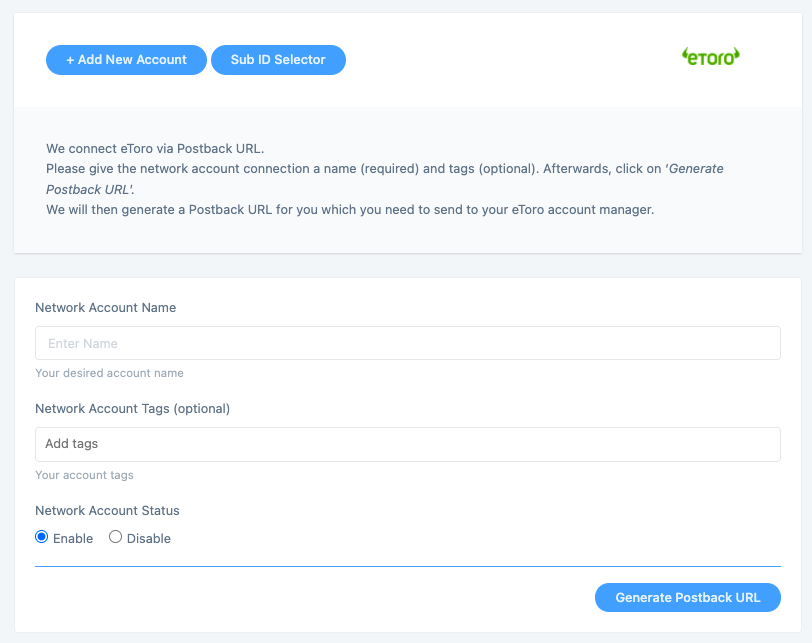
Within our system you can connect your eToro account via a Postback URL. You will need to generate that Postback URL on our platform and then you need to send to your eToro account manager in order to be included in your account.

You can generate your eToro Postback URL here: https://app.wecantrack.com/user/data-source/networks/etoro/accounts/create
How can I create a Postback URL for eToro?

  • Log into your wecantrack account and go to Data Sources > Affiliate Networks > eToro.
  • Click + Add New Account and select Postback.
  • Give the account a name (this appears in your reports).
  • Click Generate Postback URL and copy it.
  • Log into your eToro dashboard, paste the URL into the Postback URL field, and save.

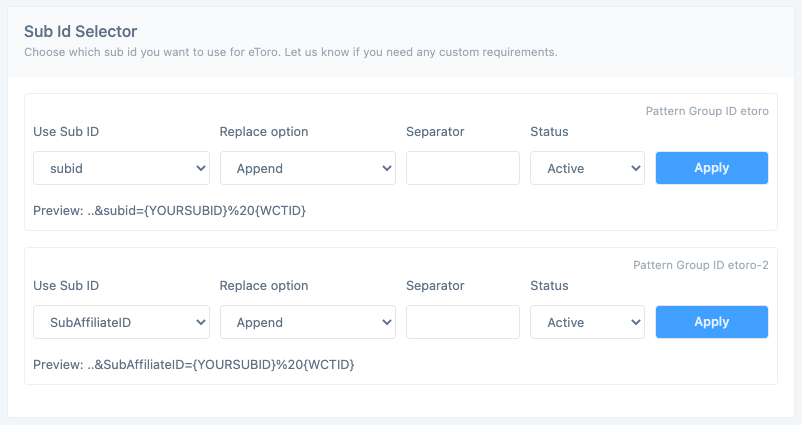
How can I adjust the SubID parameter used for my eToro affiliate links?

eToro passes SubIDs via a configurable macro on affiliate links. wecantrack automatically injects its tracking SubID into the default parameter (commonly sub_id). Edit the SubID selector inside your eToro data source settings if your account uses a different macro name.

Who this eToro integration is for

Connecting eToro to wecantrack makes sense if you fall into any of these buckets:

  • Trading, crypto, and personal-finance content sites running eToro Partners affiliate links who need per-funded-trader commission data back in Google Analytics.
  • YouTube and newsletter creators promoting eToro to first-time traders and crypto investors who need session-level CPA data alongside their eToro dashboards.
  • Paid media buyers running Google Ads, Microsoft Ads, or Meta to eToro landing pages and needing first-deposit and qualifying-trader commission data flowing back for ROAS optimisation.
  • Crypto and stock review sites operating across multiple broker programs who need clean per-broker SubID attribution to compare eToro against alternatives like Plus500 and IBKR.
  • Existing wecantrack customers adding eToro alongside other broker programs (AvaTrade, Pepperstone, Plus500) for unified trading-vertical attribution.

eToro affiliate program at a glance

eToro logo

eToro is a global social-trading and multi-asset investment platform offering stocks, ETFs, forex, commodities, and crypto, with the eToro Partners affiliate program rewarding publishers for newly funded traders. Connect your eToro Partners account to wecantrack and every commission lands in Google Ads, Microsoft Ads, and Meta tied to the click that brought the trader in.

  • Brand type: Global social-trading and multi-asset broker (eToro Group)
  • Affiliate platform: eToro Partners (direct), with Impact integration available
  • Integration method: Postback URL
  • Tracked event: Newly funded trader (first deposit), qualifying trader
  • Commission models: CPA (up to $250 per FTD, tier-based), RevShare, Hybrid
  • Reporting granularity: Per-affiliate, per-SubID, per-traffic source
  • Cookie window: Defined per offer (typically 30-90 days)
  • Publisher payouts: Monthly, multi-currency

Frequently asked questions

Does eToro support API or only Postback URL?

On eToro, the integration with wecantrack runs through Postback URL. Generate the credentials in wecantrack (or eToro), paste them in the other system, and conversions flow on every qualifying event.

What event does the eToro integration track?

Whatever the eToro offer is configured to fire on: a completed sale, a qualified lead, or a custom event. Sale amount, commission, transaction ID, and SubID flow through to wecantrack.

Will my eToro conversions show up in Google Ads, Microsoft Ads, and Meta?

Yes. wecantrack pushes attributed eToro conversions into Google Ads, Microsoft Ads, and Meta as offline conversions or server-side events, matched to the click. Optimise paid campaigns on real commission revenue.

Do I need a developer to set up the eToro integration?

No. Setup is copy-paste between wecantrack and your eToro dashboard. Most affiliates connect eToro in under fifteen minutes.

Can I track SubIDs through eToro?

Yes. wecantrack preserves eToro's SubID parameters and passes them through to Google Analytics, Google Ads, Microsoft Ads, and Meta.

How long does eToro setup take?

Ten to fifteen minutes end to end: configure credentials between wecantrack and eToro, and conversions start flowing on the next eToro event.

Other trading and crypto broker programs we track:

AvaTrade
Axi
Binance
Bybit
Coinbase
currency.com
Deriv
Exness
IronFX
Kraken
Markets.com
NAGA
OANDA
Pepperstone
Plus500
Tickmill
XTB

How to import eToro conversions in Google Analytics?

Once you fully connected your eToro accounts to wecantrack you have the possibility to let us integrate your conversions in your Google Analytics accounts. To accomplish that only two more steps are needed (JavaScript insertion and Ecommerce activation in Google Analytics accounts) which should not take longer than 10 minutes.

Would you like to get more information on how to automatically import affiliate conversion data in Google Analytics? On our Google Analytics Integration page you can find everything you need to know about connecting affiliate networks with Google Analytics:

How to import eToro conversions in Google Ads?

You can choose from different methods to integrate your eToro conversions into your Google Ads account, campaigns, keywords, adgroups and ads. With wecantrack you have available a Direct Google Ads integration, a Google Ads Integration via Google Analytics and an offline conversion import option. You can find out all about the setup required and the difference between them in our Google Ads integration page.

How to import eToro conversions in Microsoft Ads?

Once you have connected your eToro accounts and websites to our system, we can integrate affiliate conversion data coming from Microsoft Ads campaigns in your Microsoft Ads account. All you need to do is activate our Microsoft Ads integration feature and set up a conversion goal within your Microsoft Ads account and we will push the conversions to your campaigns.

How to import eToro conversions in Facebook Ads manager?

Integrate all your affiliate sales into Facebook Ads Manager. That will allow you to optimize your eToro Facebook campaigns in order to achieve the best ROIs. By activating our integration, you can easily import your eToro affiliate conversion data in your Facebook Pixel via the Facebook Conversion API. Simply add your eToro account and your website to our system and we will do the rest!