
Connect all your Lomadee affiliate sales and lead data with custom dashboards and integrate it in your marketing tools so you can focus on improving your campaigns and marketing performance.


In order to integrate Lomadee affiliate conversions in Google Analytics, Google Ads and other marketing platforms, we will attribute your affiliate conversion data to your traffic data. Once you placed our JavaScript tag or installed our WordPress plugin on your website, our software automatically places SubIDs (mdasc) with unique click IDs in your Lomadee affiliate links, which enables us to automatically match your traffic and affiliate conversion data.
The installation is done in four simple steps:
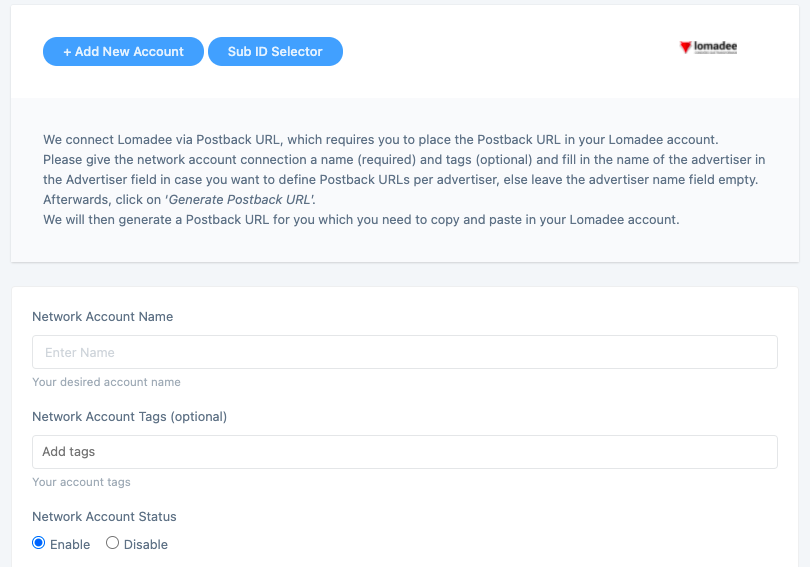
All you need to connect your Lomadee account with our system is to generate a Postback URL on our platform which you will then place in your Lomadee affiliate network account. You can generate your Lomadee Postback URL here: https://app.wecantrack.com/user/data-source/networks/lomadee/accounts/create
Once you fully connected your Lomadee accounts to wecantrack you have the possibility to let us integrate your conversions in your Google Analytics accounts. To accomplish that only two more steps are needed (JavaScript insertion and Ecommerce activation in Google Analytics accounts) which should not take longer than 10 minutes.
Do you want to learn more about our Google Analytics Integration feature? On our Google Analytics Integration page you can learn about the following:You can choose from different methods to integrate your Lomadee conversions into your Google Ads account, campaigns, keywords, adgroups and ads. With wecantrack you have available a Direct Google Ads integration, a Google Ads Integration via Google Analytics and an offline conversion import option. You can find out all about the setup required and the difference between them in our Google Ads integration page.
Grow your affiliate income with affiliate conversion tracking in tools like Google Analytics, Google Ads, Microsoft Ads, Facebook Ads and more.