CityAds Postback Integration

CityAds’s CIS, Europe, and APAC CPA conversions land in Google Ads, Microsoft Ads, and Meta inside wecantrack, with SubID and offer detail intact for every payout.

All your CityAds conversions in:

How to integrate CityAds affiliate conversions in Google Analytics

You can now easily integrate CityAds conversions in Google Analytics and other marketing tools, to achieve that we will need to attribute your affiliate sale conversion data to your traffic data. Once you have placed our JavaScript tag or installed our WordPress plugin on your website, our software will automatically place relevant SubIDs in your CityAds affiliate links, which enables us to automatically match your traffic and affiliate conversion data.

The installation is done in four simple steps:

  1. Create a wecantrack account
  2. Connect your CityAds account to our system via API
  3. Connect your website to our system
  4. Activate the integration feature

How to connect your CityAds account via Postback URL

Within our system you can connect your CityAds account via a Postback URL. You will need to generate that Postback URL on our platform and then place it in your CityAds affiliate network account. You can generate your CityAds Postback URL here: https://app.wecantrack.com/user/data-source/networks/cityads/accounts/create
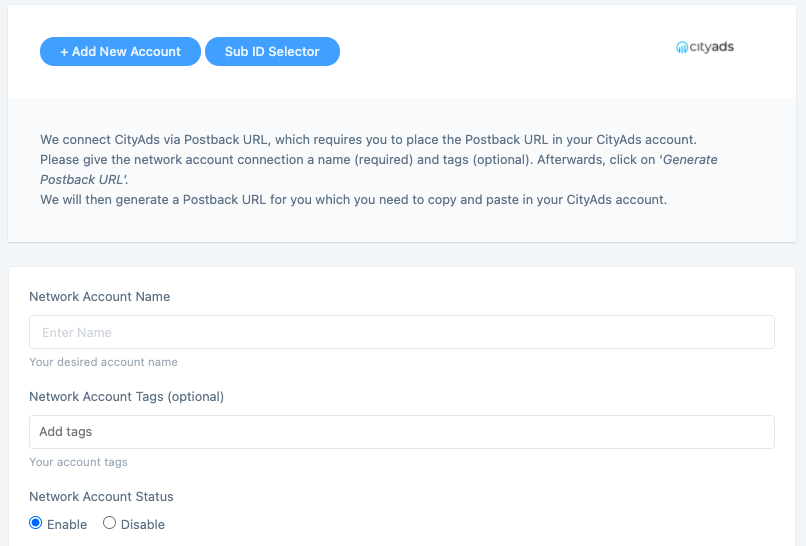
How can I create a Postback URL for CityAds?

  • Log into your wecantrack account and go to Data Sources > Affiliate Networks > CityAds.
  • Click + Add New Account and select Postback.
  • Give the account a name (this name appears in your reports).
  • Click Generate Postback URL and copy it.
  • Log into your CityAds affiliate dashboard, paste the URL into the Postback URL field under settings, and save.

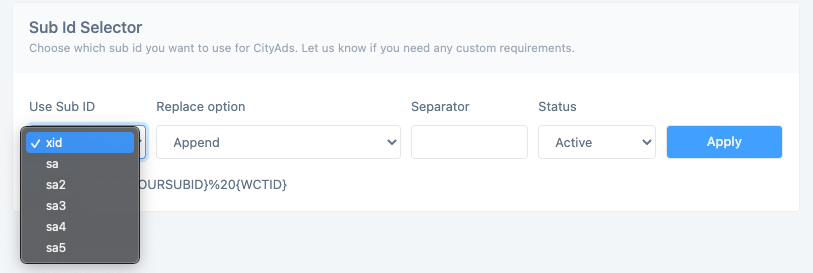
How can I adjust the SubID parameter used for my CityAds affiliate links?

CityAds passes SubIDs via a configurable macro on affiliate links. wecantrack automatically injects its tracking SubID into the default parameter (commonly subid1). If your CityAds account uses a different macro name, edit the SubID selector inside your CityAds data source settings.

Who this CityAds integration is for

Connecting CityAds to wecantrack makes sense if you fall into any of these buckets:

  • CIS and Eastern European affiliates running CityAds CPA offers across finance, ecommerce, mobile, travel, and gaming who need per-offer commission data back in Google Analytics.
  • Global content sites running CityAds programs (Aliexpress RU&CIS, regional ecommerce) who need clean SubID and offer-level attribution for paid acquisition.
  • Paid media buyers running Google Ads, Microsoft Ads, or Meta to CityAds landing pages and needing CPA data flowing back for ROAS optimisation in CIS, Europe, and APAC GEOs.
  • Performance teams scaling mobile and gaming offers on CityAds who need install and event-level data unified across their cross-network dashboards.
  • Existing wecantrack customers adding CityAds alongside other CIS and global networks (Admitad, Awin, Tradedoubler) for unified regional reporting.

CityAds CPA network at a glance

CityAds logo

CityAds is a global CPA affiliate network powered by big-data targeting, serving advertisers and publishers across finance, ecommerce, mobile, travel, and gaming verticals with strong reach across the CIS, Europe, and APAC. Connect your CityAds publisher account to wecantrack and every commission gets matched to the click, campaign, and keyword that produced it.

  • Network type: Global CPA affiliate network (CIS, Europe, APAC)
  • Integration methods: API, Conversion Postback, Widgets, Product feed upload
  • Tracked event: Sale, lead, install, or custom action, depending on offer
  • Commission models: CPA, CPL, CPI, RevShare
  • Reporting granularity: Per-offer, per-affiliate, per-SubID, per-GEO
  • Cookie window: Defined per offer by CityAds
  • Publisher payouts: Monthly, multi-currency (RUB, EUR, USD)
  • Program contact: Publisher dashboard at cityads.com

Frequently asked questions

Does CityAds support API or only Postback URL?

CityAds supports both. The CityAds Conversion Postback is the simpler setup with wecantrack. For richer per-offer detail, use the CityAds API.

What event does the CityAds integration track?

Whatever the offer is configured to fire on CityAds: a completed sale, a qualified lead, an app install, or a custom event. Sale amount, commission, transaction ID, offer, and SubID flow through to wecantrack.

Will my CityAds conversions show up in Google Ads, Microsoft Ads, and Meta?

Yes. wecantrack pushes attributed CityAds conversions into Google Ads, Microsoft Ads, and Meta as offline conversions or server-side events, matched to the click. Optimise CIS and global paid campaigns on real CPA revenue.

Do I need a developer to set up the CityAds integration?

No. The postback URL is copy-paste: generate it in wecantrack, save it in your CityAds dashboard. Most affiliates connect CityAds in under fifteen minutes.

Can I track SubIDs and GEOs through CityAds?

Yes. wecantrack preserves CityAds's SubID parameters and GEO data and passes them through to Google Analytics, Google Ads, Microsoft Ads, and Meta. Break down CPA revenue by campaign, GEO, or offer.

How long does CityAds setup take?

Ten to fifteen minutes end to end: generate the postback URL in wecantrack, paste it into your CityAds dashboard, and conversions start flowing on the next CityAds event.

Advertisers within CityAds we track for our customers:

CityAds doesn't publish a public advertiser directory and offers are typically GEO-restricted. The campaigns visible inside your dashboard depend on the verticals and GEOs you've been approved for. Connect your CityAds account to wecantrack to import every active offer, SubID, and commission you have access to into your unified dashboard.

How to import CityAds conversions in Google Analytics?

Once you fully connected your CityAds accounts to wecantrack you have the possibility to let us integrate your conversions in your Google Analytics accounts. To accomplish that only two more steps are needed (JavaScript insertion and Ecommerce activation in Google Analytics accounts) which should not take longer than 10 minutes.

Would you like to get more information on how to automatically import affiliate conversion data in Google Analytics? On our Google Analytics Integration page you can find everything you need to know about connecting affiliate networks with Google Analytics:

How to import CityAds conversions in Google Ads?

You can choose from different methods to integrate your CityAds conversions into your Google Ads account, campaigns, keywords, adgroups and ads. With wecantrack you have available a Direct Google Ads integration, a Google Ads Integration via Google Analytics and an offline conversion import option. You can find out all about the setup required and the difference between them in our Google Ads integration page.

How to import CityAds conversions in Facebook Ads manager?

Integrate all your affiliate sales into Facebook Ads Manager. That will allow you to optimize your CityAds Facebook campaigns in order to achieve the best ROIs. By activating our integration, you can easily import your CityAds affiliate conversion data in your Facebook Pixel via the Facebook Conversion API. Simply add your CityAds account and your website to our system and we will do the rest!

Can wecantrack be used as a Voluum alternative?

We set up a comparison between wecantrack and Voluum to help you decide which tracking solution is better suited for you.