Plus500 Postback Integration

Plus500’s 500Affiliates commissions on qualified leads and funded traders flow into Google Ads, Microsoft Ads, and Meta Ads with wecantrack, through API and postback connections.

All your Plus500 conversions in:

How to integrate Plus500 affiliate conversions in Google Analytics

To integrate Plus500 conversions into Google Analytics and other marketing tools, we need to attribute your affiliate sale conversion data back to your traffic data. Once you've placed our JavaScript tag or installed our WordPress plugin on your website, wecantrack automatically adds SubIDs to your Plus500 affiliate links. That's what lets us match traffic sessions with the conversions they produce.

The installation is done in four simple steps:

  1. Create a wecantrack account
  2. Connect your 500Affiliates account to our system via Postback URL
  3. Connect your website to our system
  4. Activate the integration feature

How to connect your Plus500 account via Postback URL

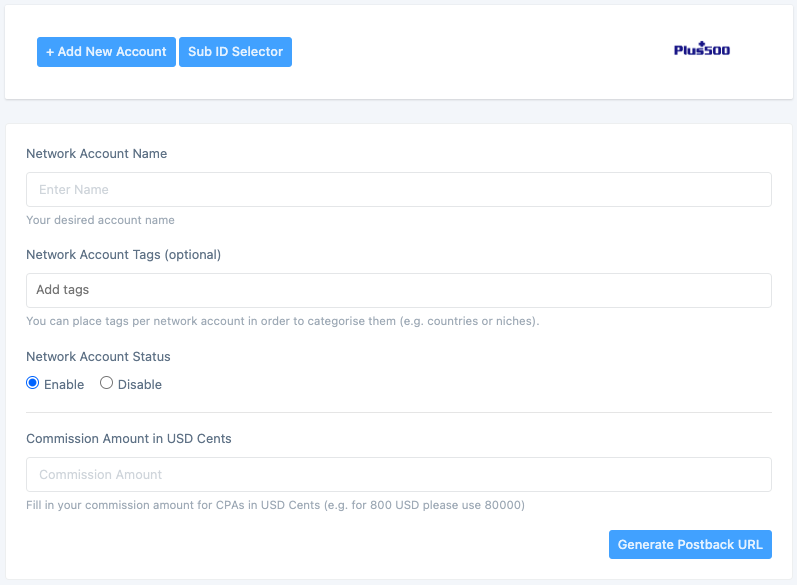
Within our system you can connect your Plus500 affiliate account via a Postback URL. You generate the Postback URL on our platform, then place it in your 500Affiliates account settings. You can generate your Plus500 Postback URL here: https://app.wecant​rack.com/user/data​-source/networks/p​lus500/accounts/cr​eate

How can I create a Postback URL for Plus500?

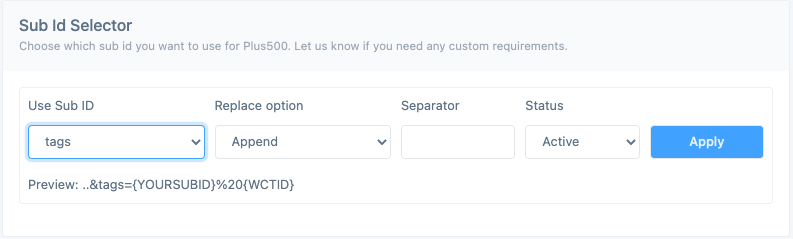
How can I adjust the SubID parameter used for my Plus500 affiliate links?

Who is the Plus500 integration for

Connecting Plus500 to wecantrack is worth it if you fall into any of these buckets:

  • Trading and finance content sites reviewing CFD brokers, forex platforms, or investing tools and sending traffic to Plus500 signup pages.
  • YouTube creators and newsletter operators in the trading, investing, or personal finance niche who need to see which videos or sends actually drive qualified traders, not just clicks.
  • Paid media buyers running Google Ads, Microsoft Ads, or Meta campaigns to 500Affiliates links and needing deposit and qualified-trader data back in the ad platform for optimisation.
  • Affiliate agencies managing multiple 500Affiliates sub-affiliates who need clean per-campaign attribution across sources and geographies.
  • Anyone already tracking other networks with wecantrack who wants Plus500 qualified traders flowing into the same Google Analytics, Google Ads, Microsoft Ads, and Facebook Ads reports as the rest of their affiliate revenue.

Plus500 affiliate program at a glance

Plus500 logo

Plus500's 500Affiliates program pays for every qualified lead and funded trader you send. Connect your 500Affiliates account to wecantrack and see which ads, keywords, and pages are producing funded accounts — not just clicks.

  • Program name: 500Affiliates
  • Network backend: 500Affiliates partner dashboard
  • Integration method: Postback URL
  • Tracked event: Qualified Trader (first-time depositor meeting activity thresholds)
  • Commission model: CPA per Qualified Trader, with tiered payouts by region and account size
  • Referral bonus: Earn on sub-affiliates you refer to 500Affiliates
  • Cookie window: Defined by 500Affiliates program terms
  • Program contact: via the 500Affiliates dashboard

Frequently asked questions

Does Plus500 have an API integration with wecantrack?

No. Plus500's 500Affiliates program exposes conversion data to partners through Postback URLs rather than a pull API. You connect wecantrack to your 500Affiliates account by pasting a wecantrack-generated Postback URL into your program settings, and 500Affiliates then pushes every conversion to us in real time.

What event does the Plus500 Postback track?

The Plus500 postback fires on the Qualified Trader event, the point at which a user referred by your 500Affiliates link deposits and meets Plus500's trading-activity threshold. That is the conversion Plus500 pays CPA on, so it is the conversion wecantrack captures and passes through to your ad platforms.

Will my Plus500 conversions show up in Google Ads, Microsoft Ads, and Meta?

Yes. Once Plus500 is connected, wecantrack deduplicates the qualified-trader conversion against the original click and sends it into Google Analytics, Google Ads, Microsoft Ads, and Facebook Ads Manager using each platform's native offline conversion import. You see Plus500 CPA revenue alongside the campaign, ad group, and keyword that drove it.

Do I need a developer to set this up?

No. The Postback URL setup inside 500Affiliates is a copy-paste job, and wiring wecantrack to Google Analytics, Google Ads, Microsoft Ads, and Meta is handled inside the wecantrack UI. The only thing you need is access to your 500Affiliates account and your ad platform accounts.

Can I track SubIDs for different campaigns?

Yes. 500Affiliates supports a SubID parameter on affiliate links, so you can label traffic by channel, creative, or campaign. wecantrack reads that SubID so you can slice Plus500 CPA revenue by whichever dimension you pass through.

How long does the integration take to set up?

Most partners finish the Plus500 Postback setup in under ten minutes. The longer part, if you have not done it before, is the initial wecantrack onboarding, connecting your Google Analytics property and ad platforms, which is a one-time setup shared across every network you add.

How to import Plus500 conversions in Google Analytics?

Once you fully connected your Plus500 accounts to wecantrack you have the possibility to let us integrate your conversions in your Google Analytics accounts. To accomplish that only two more steps are needed (JavaScript insertion and Ecommerce activation in Google Analytics accounts) which should not take longer than 10 minutes.

Do you want to learn more about our Google Analytics Integration feature? On our Google Analytics Integration page you can learn about the following:

How to import Plus500 conversions in Google Ads?

You can choose from different methods to integrate your Plus500 conversions into your Google Ads account, campaigns, keywords, adgroups and ads. With wecantrack you have available a Direct Google Ads integration, a Google Ads Integration via Google Analytics and an offline conversion import option. You can find out all about the setup required and the difference between them in our Google Ads integration page.

How to import Plus500 conversions in Facebook Ads manager?

Integrate all your affiliate sales into Facebook Ads Manager. That will allow you to optimize your Plus500 Facebook campaigns in order to achieve the best ROIs. By activating our integration, you can easily import your Plus500 affiliate conversion data in your Facebook Pixel via the Facebook Conversion API. Simply add your Plus500 account and your website to our system and we will do the rest!

Can wecantrack be used as a Voluum alternative?

We set up a comparison between wecantrack and Voluum to help you decide which tracking solution is better suited for you.